Looking for accurate SEBA Class 10 Computer Science Chapter 1 (Introduction to Computer Network) textual solutions for the 2026–27 academic year? Access step-by-step textbook exercise answers, detailed explanations on LAN, MAN, WAN, network topologies, transmission media, protocol basics, and network devices designed to help you score top marks in your HSLC board exams.
I. FILL IN THE BLANKS:
1. The hostname command is used to display _.
Ans. Name of the computer.
2. The length of a IPv4 and a IPv6 is _ and bytes respectively.
Ans. 32 bit and 128 bit.
3. An access point is used to connect _.
Ans. Wireless network.
4. The ping command is used to _.
Ans. Check the connectivity between two computers.
5. HTTPS transfer _ data.
Ans. Encrypted.
Class 10 Computer Science Chapter 1 Question Answer SEBA 2026-27
II. MULTIPLE CHOICE QUESTIONS:
1. Which device is required to connect multiple heterogeneous networks?
A) Hub
B) Switch
C) Router
D) Access Point
Ans. (C) Router.
2. Which is the largest type of computer network?
A) PAN
B) LAN
C) MAN
D) WAN
Ans. (D) WAN.
3. Which protocol transfers encrypted data instead of plain data?
A) HTTP
B) HTTPS
C) FTP
D) SMTP
Ans. (B) HTTPS.
Introduction to Computer Network Class 10 SEBA Textual Exercise Solutions
4. How many bytes are reserved for OUI in a MAC address?
A) 3
B) 8
C) 24
D) 12.
Ans. (C) 3.
5. IP address can be automatically assigned if the network is connected with
A) Access Point
B) Mail Server
C) Web Server
D) DHCP Server
Ans. (D) DHPC Server.
SEBA Class 10 Computer Science Chapter 1 Notes
Q1.Mention the components required to set up a MAN network and draw a block diagram labeling each component.
Answer:
Main Components of MAN are:
LANs: Local networks in offices, schools, or branches.
Routers: Connect different LANs together.
Switches: Connect computers within each LAN.Fiber Optic Cables: Provide fast connection between LANs.Block Diagram:
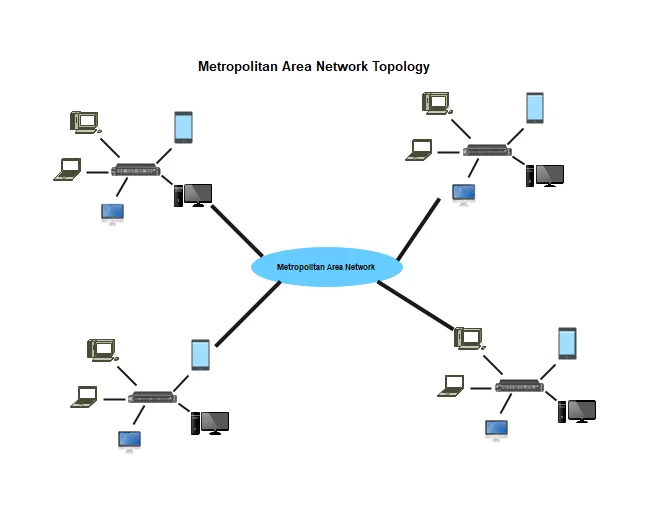
Q2. Why should a hostname not be used to identify a computer in a computer network?
Answer: A hostname should not be used to identify a computer in a network because of the following reasons:
1)Two or more computers on the same network can have the same hostname, which creates confusion.
2)A hostname can easily be changed by the user at any time.
3)A hostname does not tell the network where the computer is actually located, so routers cannot send data using only the name.
Q3. Give five examples of valid and five examples of invalid IPv4 addresses.
Answer: Five Valid IPv4 Addresses:
1) 192.168.1.1
2) 172.16.0.5
3) 10.0.0.1
4) 8.8.8.8
5) 203.0.113.255
Five Invalid IPv4 Addresses:
1) 256.100.50.25 (Reason: 256 is greater than 255)
2) 192.168.1.256 (Reason: 256 is greater than 255)
3) 192.168.1.1.5 (Reason: It has 5 numbers instead of 4)
4) 192.168.01.01 (Reason: It contains leading zeros)
5) 192.168.1 (Reason: It is missing the 4th number)
HSLC Computer Science Chapter 1 Question Answer
Q4. Can we compare HTTP and FTP protocols? Mention their functionality.
Answer: Yes, HTTP and FTP can be compared. Both are used to transfer data over the internet, but they serve different purposes.
| HTTP (Hypertext Transfer Protocol) | FTP (File Transfer Protocol) |
| It is used to load and view web pages in a browser. | It is used to upload and download files between a computer and a server. |
| It is used mainly for browsing websites and web content. | It is used mainly for transferring large files and managing directories. |
| It is used with 1 connection for data transfer. | It is used with 2 connections (one for control commands and one for data). |
| It is used without requiring a username or password. | It is used usually with a username and password to log in. |
Q5. How many 16-port switches are required to connect 31 computers in a network?
Answer:
3 switches are required.
1) The 1st switch has 16 ports minus 1 link port = 15 ports for computers.
2) The 2nd switch has 16 ports minus 2 link ports = 14 ports for computers.
3) The 3rd switch has 16 ports minus 1 link port = 15 ports for computers.
Total capacity: 15 + 14 + 15 = 44 computers
Since 2 switches can only connect 30 computers, 3 switches are needed to connect 31 computers.
SEBA Class 10 Computer Science Chapter 1 Solutions
💻 Updated Solutions Notice: This page features complete, step-by-step SEBA Class 10 Computer Science Chapter 1 (Introduction to Computer Network) Textual Exercise Solutions updated for the 2026–27 academic session. All definitions, topology comparisons, network architecture concepts, and device explanations strictly follow the latest revised Assam Board (SEBA) textbook.
💡 Ace Your HSLC Computer Science Exam:
- Have a doubt about star vs. mesh topology, routers vs. switches, or OSI layer basics in Chapter 1? Leave your query in the comments section below!
- Save and bookmark this solution guide for fast reference before your unit tests, half-yearly, and pre-board examinations.
- Share this link with your classmates and WhatsApp study groups to help them prepare thoroughly!